Data access actions
Data access actions connect your flows to external data sources and services. Use them to search the web, retrieve the contents of a webpage, or send and receive data from any URL or API endpoint.
Tip
These action descriptions cover the most commonly used inputs and outputs. When designing flows, you may also notice additional input and output variables.
Web SearchLink copied!
Searches the internet for web pages that match a provided query.
Examples of when to use this action:
- Trend research for a campaign brief. A flow searches for “autumn/winter denim trends 2026” restricted to a handful of trusted fashion press domains, then feeds the results into a content generation action that drafts a landing page intro. You get relevant copy without a writer spending hours researching.
- Competitor gap check. Restrict the Web search to three competitor domains, ask for a product category, and use the results to identify what they’re merchandising that you aren’t.
- Verify before publish. Confirm a claim in your draft copy (e.g. a sustainability certification) by verifying against approved sources.
Note
This action is also available as a tool within custom agents - Calling it directly as a flow action lets you control exactly which requests are made and when, instead of leaving it to the LLM to decide.
ConfigurationLink copied!
| Setting | Description |
|---|---|
Only search these websites | Restrict searches to specific websites. Accepts a comma-separated list of domains (e.g. anyafinn.com, acme.com). Optional |
Do not search these websites | Prevent specific websites from appearing in results. Accepts a comma-separated list of domains (e.g. anyafinn.com, acme.com). Optional |
InputsLink copied!
| Input | Type | Required | Description |
|---|---|---|---|
query | string | Yes | The question or topic to search for |
OutputsLink copied!
| Output | Type | Description |
|---|---|---|
results | array | A list of matching web pages. Each result contains a name, url, and description |
Example:
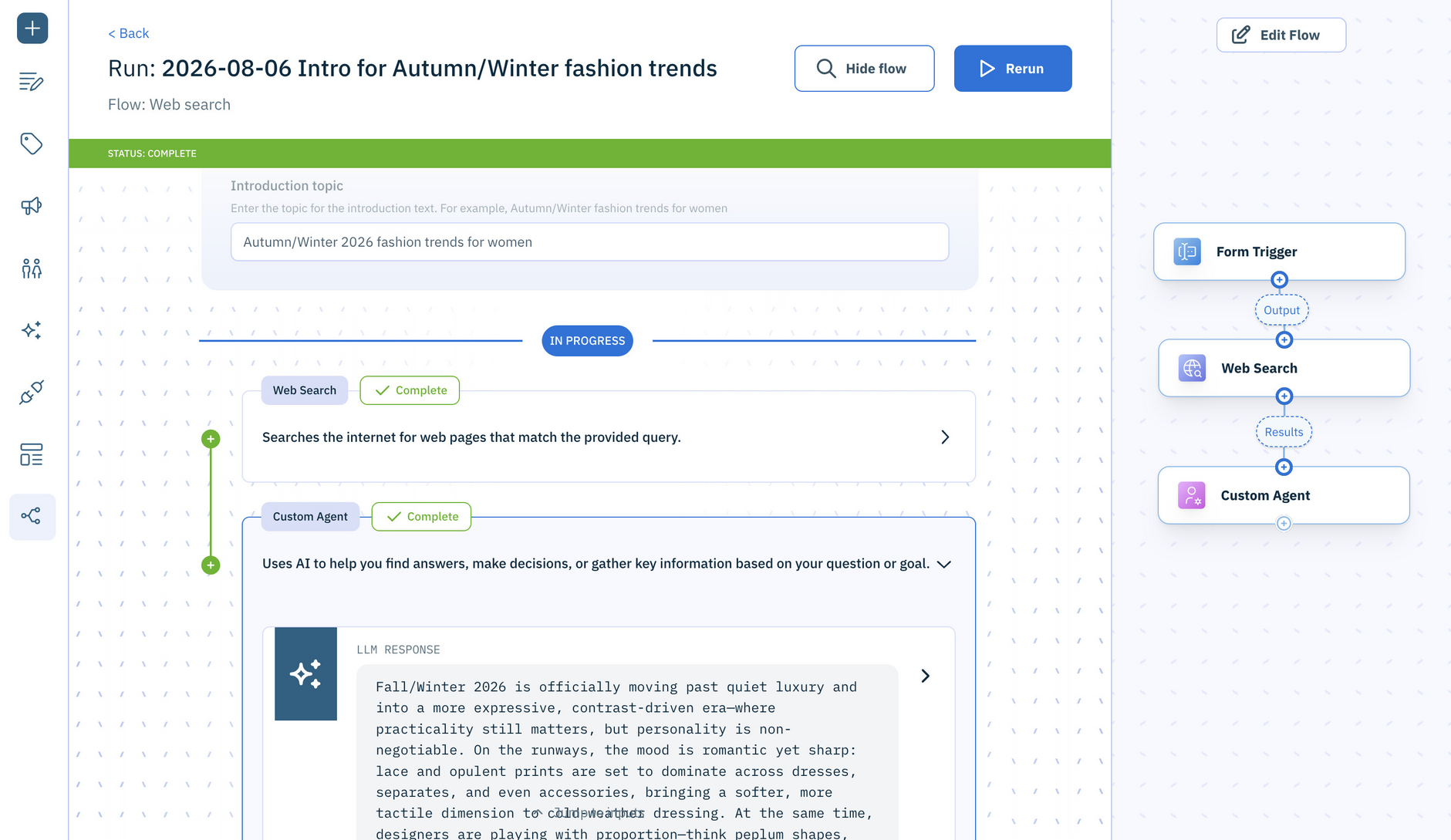
Here's Web Search in use for generating a blog introduction from trusted fashion press domains. The input form establishes the blog topic and passes it to the Web Search action which is configured with the fashion domains. The Custom Agent then uses that content to generate the blog introduction.
Get Webpage ContentLink copied!
Extracts content from a webpage.
Examples of when to use this action:
- Repurposing your own content. Read a published blog post and generate the social variants, email teaser, and meta description from it - one source of truth, no copy-paste.
- Localization source. Get the live copy from your .com page and use it as the input for translated regional versions.
- Fact checking. After generating a product description, read the live manufacturer's URL back and check the product details match.
Note
This action is also available as a tool within custom agents - Using it directly as a flow action lets you control exactly which requests are made and when, instead of leaving it to the LLM to decide.
InputsLink copied!
| Input | Type | Required | Description |
|---|---|---|---|
url | string | Yes | The address of the webpage to extract content from (e.g. https://example.com) |
OutputsLink copied!
| Output | Type | Description |
|---|---|---|
contentType | string | The content type of the retrieved page (e.g. text/html) |
content | string | The extracted content of the webpage |
Example:
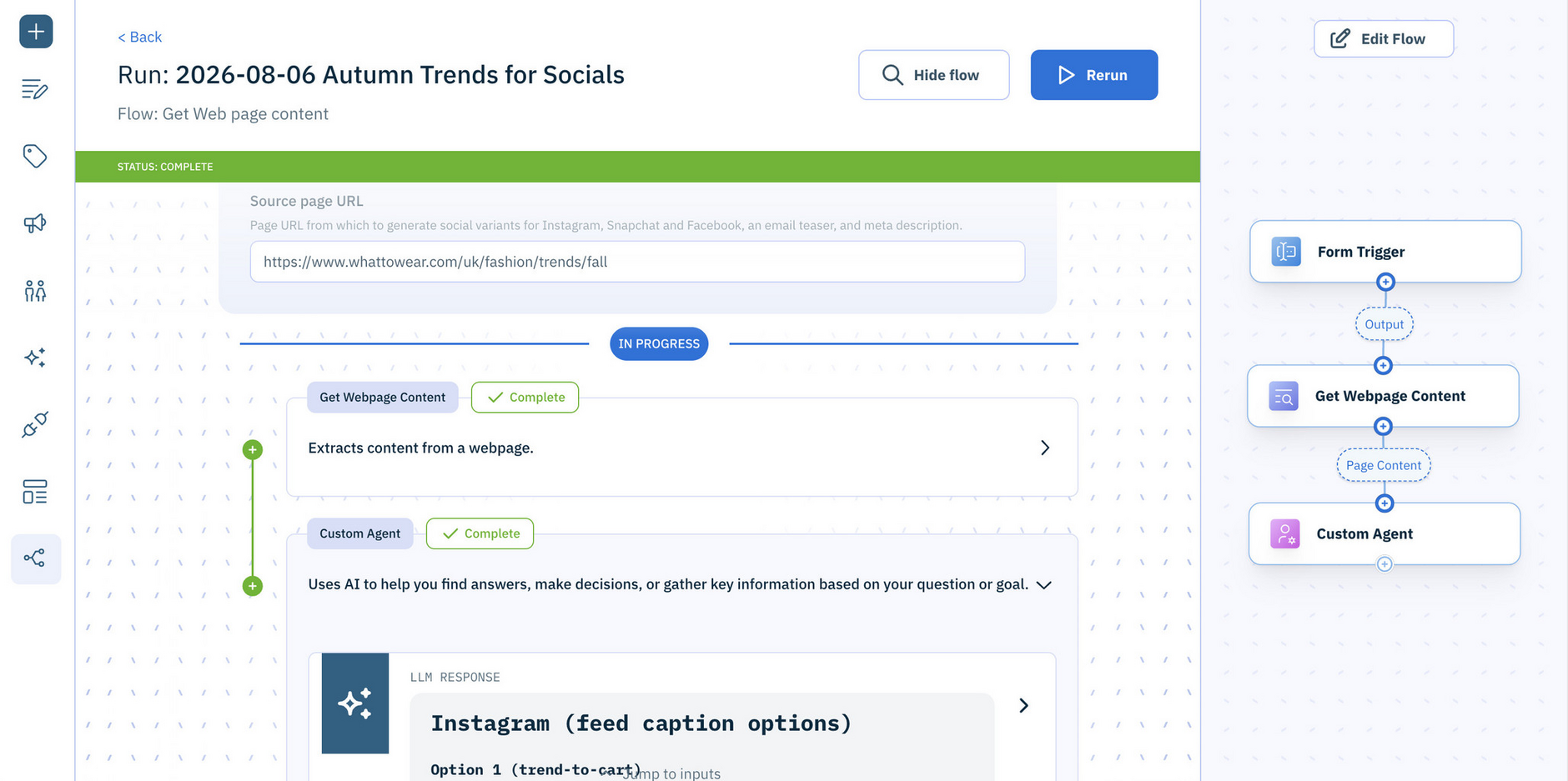
Here's Get Webpage Content in use. The input form collects a published page URL (here, a blog post) and passes it to the Get Webpage Content action to retrieve the page content. The Custom Agent then uses that content to generate the social variants, email teaser, and meta description.
Make HTTP RequestLink copied!
Connects to a URL to retrieve or send information.
Examples of when to use this action:
- Notify a human. POST to a Slack or Teams webhook when a flow finishes or fails. For example, send “12 product descriptions ready for review” direct to the channel instead of nobody noticing.
- Create a ticket. POST to Jira or Asana when a human review step rejects an asset, so the fix gets tracked properly.
- Pull from a PIM or spreadsheet service. GET a JSON feed of this week’s new arrivals and loop over it to create content for each SKU.
- Trigger something downstream. POST to your site’s build or cache-invalidation endpoint after content publishes.
- Use an internal service. Call your own translation, brand-compliance or pricing API with an auth header, and use
jsonContentto read the answer straight into the next step.
Info
This action supports HTTP basic authentication only.
InputsLink copied!
| Input | Type | Required | Description |
|---|---|---|---|
method | string | No | The HTTP method to use. One of: GET, POST, PUT, PATCH, DELETE, HEAD |
url | string | Yes | The web address of the data or service to connect to |
headers | array | No | One or more request headers to include. Each header has a name (e.g. Content-Type) and a value (e.g. application/json) |
body | string | No | Data to send with the request. Only available when the method is POST, PUT, or PATCH |
OutputsLink copied!
| Output | Type | Description |
|---|---|---|
status | number | The HTTP status code returned by the server |
headers | array | The response headers returned by the server. Each header has a name and a value |
content | string | The response body as text |
jsonContent | any | The parsed JSON response body, if the server returned JSON |