Helper actions
Helper actions are lightweight utility actions for connecting, transforming, and manipulating data between the larger actions in your flows. Use them to tasks such as parsing file paths, encoding URLs, extracting values from JSON objects, and building new data structures.
Helper actions do not consume Amplience Credits.
Tip
These action descriptions cover the most commonly used inputs and outputs. When designing flows, you may also notice additional input and output variables.
Set Custom AttributesLink copied!
Allows you to add custom attributes for improved filtering and searching of review output.
Inputs: String
Outputs: None
How to use: Specify key-value attribute pairs in your flows - up to a maximum of 10 pairs per flow.
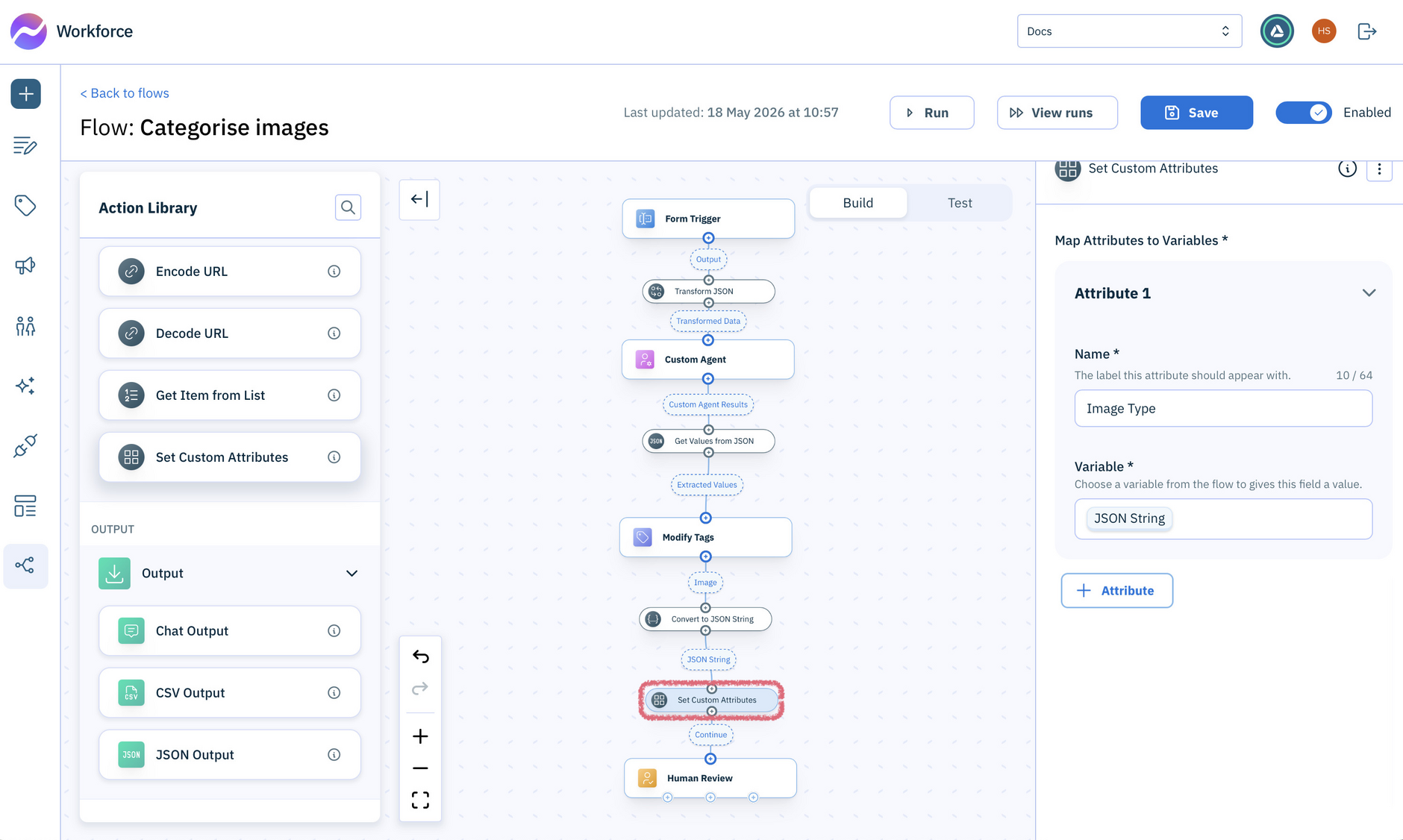
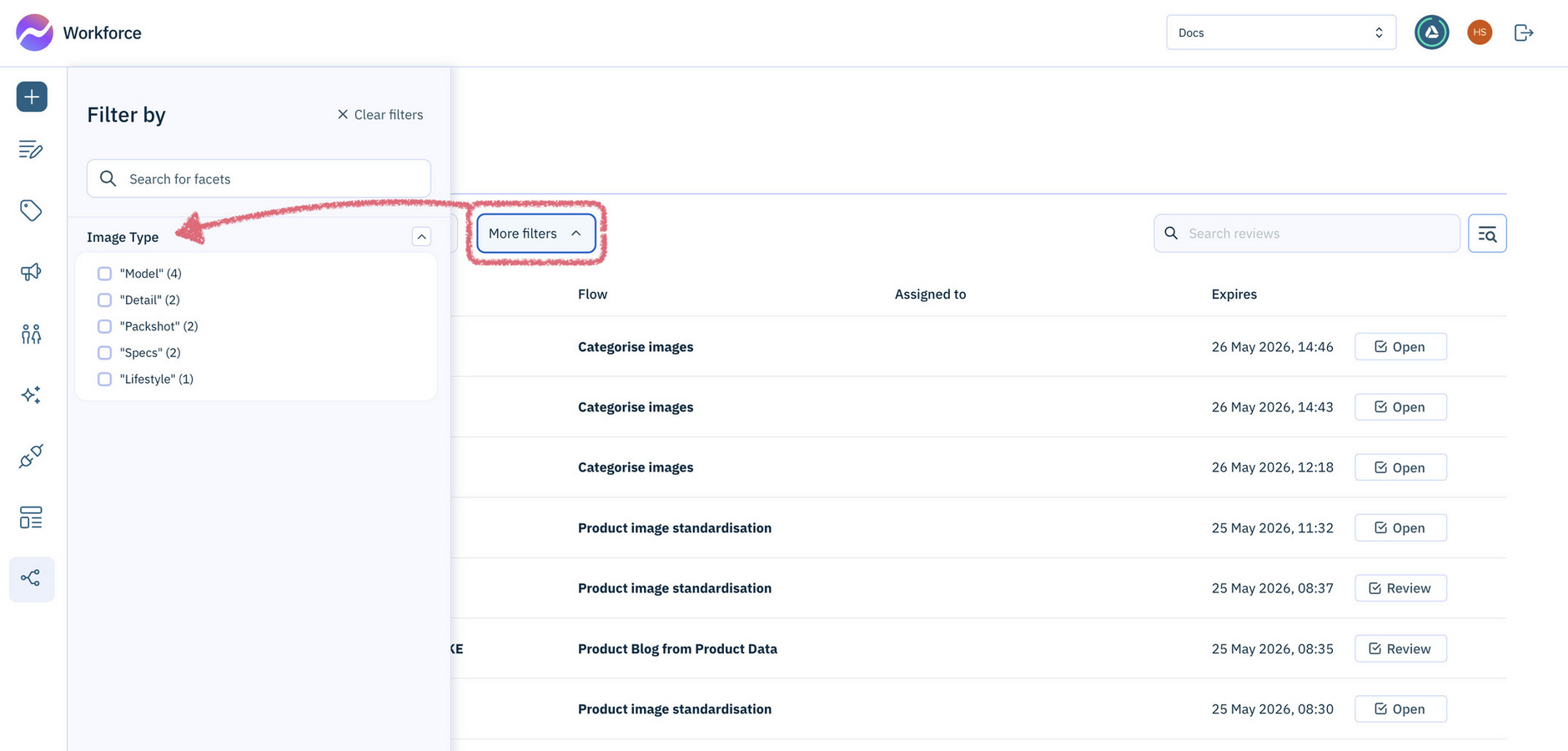
This example shows the Set Custom Attributes action being used to configure Image Type and SKU as custom filters. Once set, these filters appear automatically in the Flows Reviews list.
Tip
The attribute Name is case-sensitive, so use consistent capitalization to avoid duplicate filters.
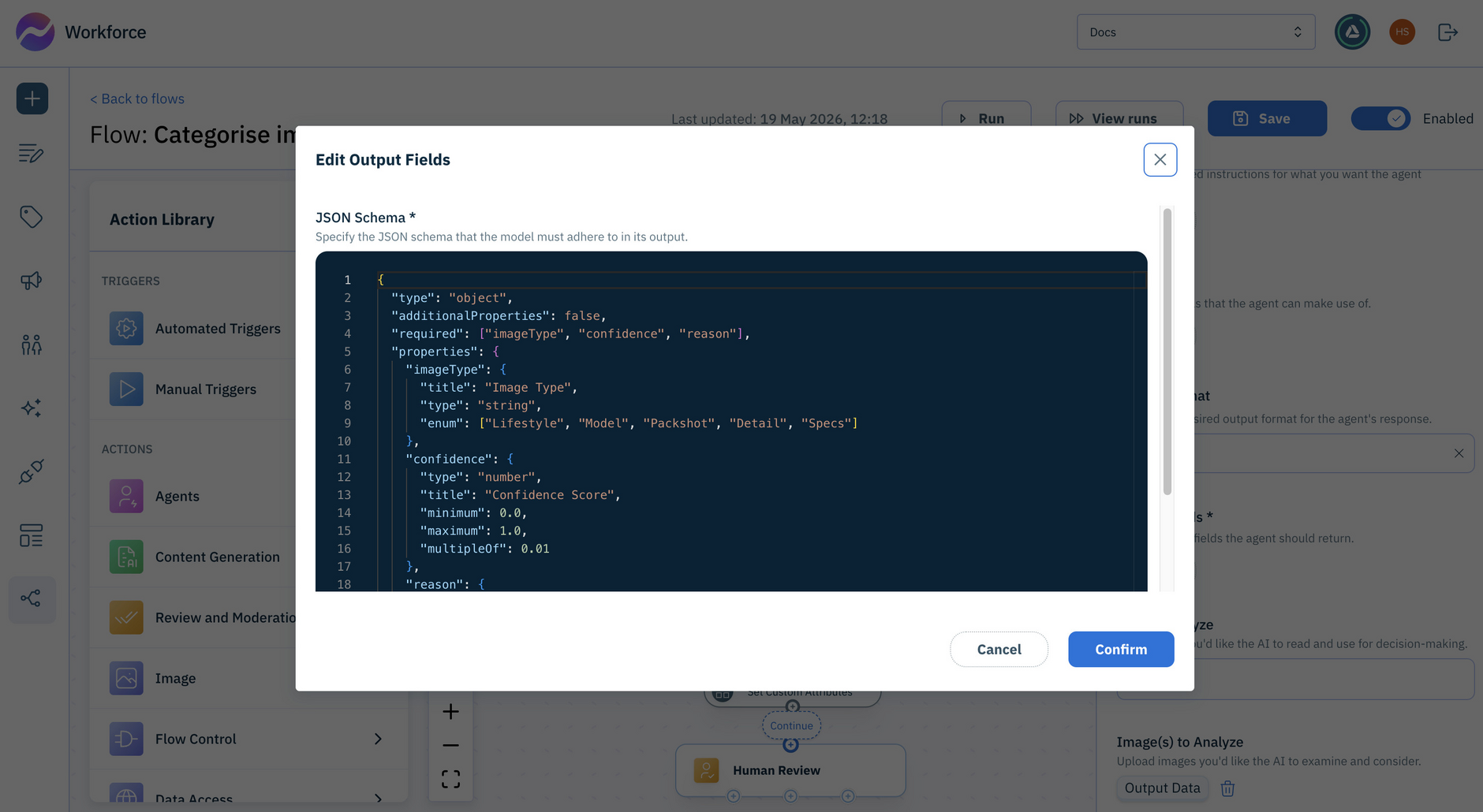
The Variable is determined by what you want to create filters for, and must be a string value. In this example, the Custom Agent output defines the imageType property values that will be used for filtering reviews:
This would show as an additional filter in the Reviews list filters:
Split File NameLink copied!
Splits a file path into its parts: directory path, base name, and extension.
Inputs
| Input | Type | Required | Description |
|---|---|---|---|
File Path | string | Yes | The file path or filename to extract parts from (e.g. documents/product-1.jpg) |
Outputs
| Output | Type | Description |
|---|---|---|
Base Name | string | The name of the file without its extension |
Extension | string | The file extension (e.g. .pdf) |
Directory Path | string | The directory path leading to the file (empty if none) |
Featured in these example flows
Convert from JSONLink copied!
Converts a JSON string into structured data (objects, arrays, numbers, or text) you can use in your flow.
Inputs
| Input | Type | Required | Description |
|---|---|---|---|
JSON String | string | Yes | The JSON text to decode (e.g. {"sku": "123456"}) |
Outputs
| Output | Type | Description |
|---|---|---|
JSON Object | any | The result of decoding the JSON string. This may be an object, array, number, string, or boolean, depending on the input |
Convert to JSON StringLink copied!
Transforms JSON data into a JSON string representation.
Inputs
| Input | Type | Required | Description |
|---|---|---|---|
Object | any | No | The object to encode (e.g. { product: "shirt" }) |
Outputs
| Output | Type | Description |
|---|---|---|
JSON String | string | The result of transforming the object into a JSON string |
Featured in these example flows
Get Values from JSONLink copied!
Extracts specific fields or values from data using JSONPath expressions.
ConfigurationLink copied!
Before using this action, define the values you want to extract. For each value, provide a name and a JSONPath expression that identifies the field to extract from the input data. Each configured value appears as a separate output on the action.
Inputs
| Input | Type | Required | Description |
|---|---|---|---|
Values to Extract | any | No | The data object or array to extract values from |
Outputs
The output fields for this action are determined by the values you define in the action configuration. Each configured value appears as a separate output field using the name you provided.
Featured in these example flows
Build JSON objectLink copied!
Builds a JSON object from a set of properties you define when configuring the action.
ConfigurationLink copied!
Before using this action, define the properties you want to include in the output object. Each property you add becomes an input field on the action, allowing you to populate it with a value or a variable from an earlier action in the flow.
Inputs
The input fields for this action are determined by the properties you define in the action configuration. Each configured property appears as a separate input field.
Outputs
| Output | Type | Description |
|---|---|---|
JSON Object | object | A JSON object containing the properties and values provided as inputs |
Transform JSONLink copied!
Transforms input data using either a Handlebars template or a JSONata query.
ConfigurationLink copied!
Before using this action, choose the transform language and provide the template or query to apply.
| Setting | Description |
|---|---|
Transform Language | The language to use for the transformation. Accepted values: Handlebars, JSONata (default) |
Template | A Handlebars template to apply to the input data. Only shown when Transform Language is set to Handlebars |
Query | A JSONata query to apply to the input data. Only shown when Transform Language is set to JSONata |
Inputs and outputsLink copied!
Inputs
| Input | Type | Required | Description |
|---|---|---|---|
Data | any | No | The JSON data to transform |
Outputs
The output field depends on the transform language configured.
| Output | Type | Language | Description |
|---|---|---|---|
Output Text | string | Handlebars | The transformed output as a text string |
Output Data | any | JSONata | The transformed output as structured data |
Combining inputs to Transform JSON
The Transform JSON helper accepts a single input. If you need to transform JSON data from multiple inputs, you can first combine them into a single object by using the Build JSON Object helper.
ExampleLink copied!
Transform JSON allows you to take JSON input and transform it into the required structure. This is particularly useful when getting data from another system, in the form of a webhook payload, for example, and easily changing its structure to send to an action.
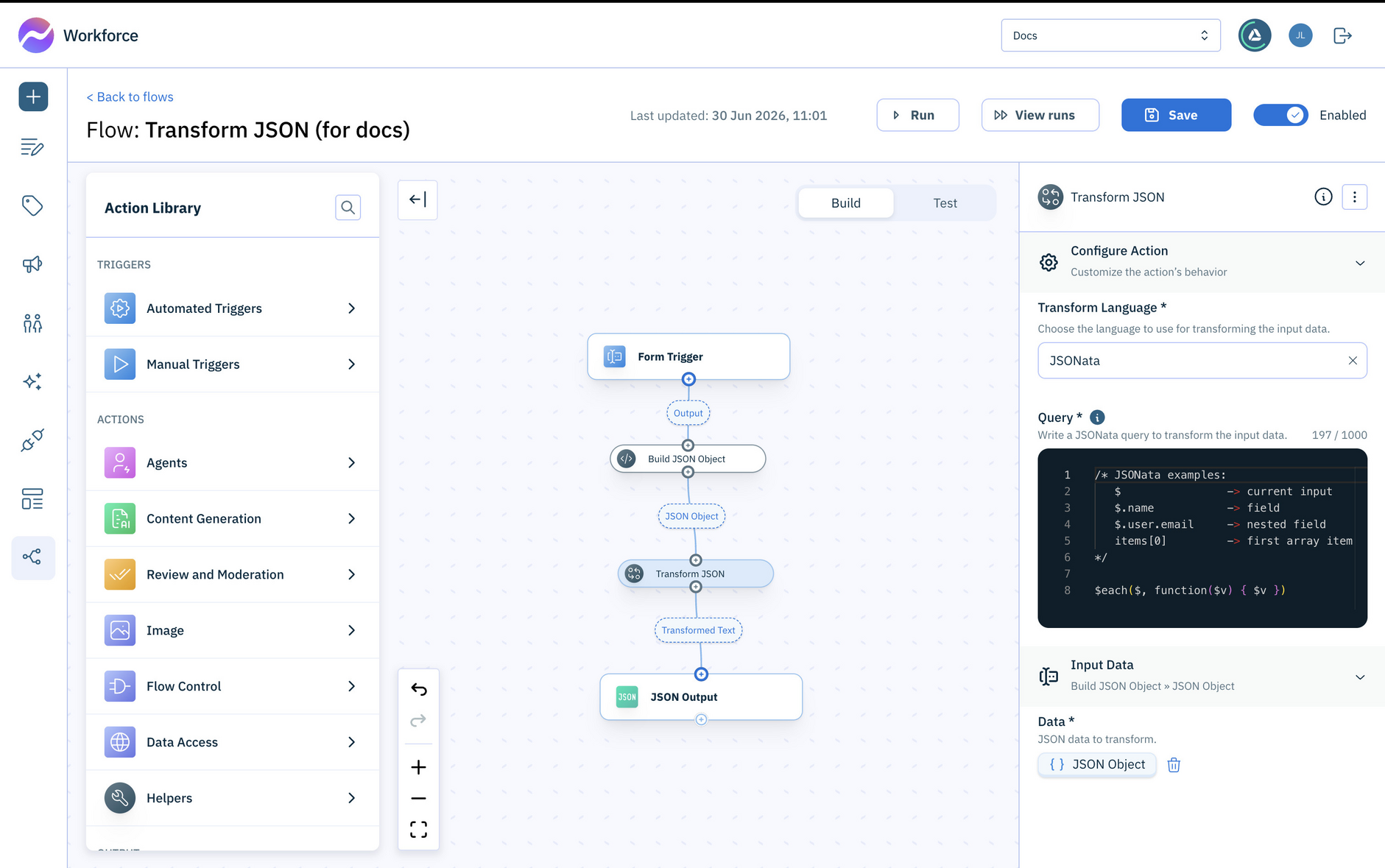
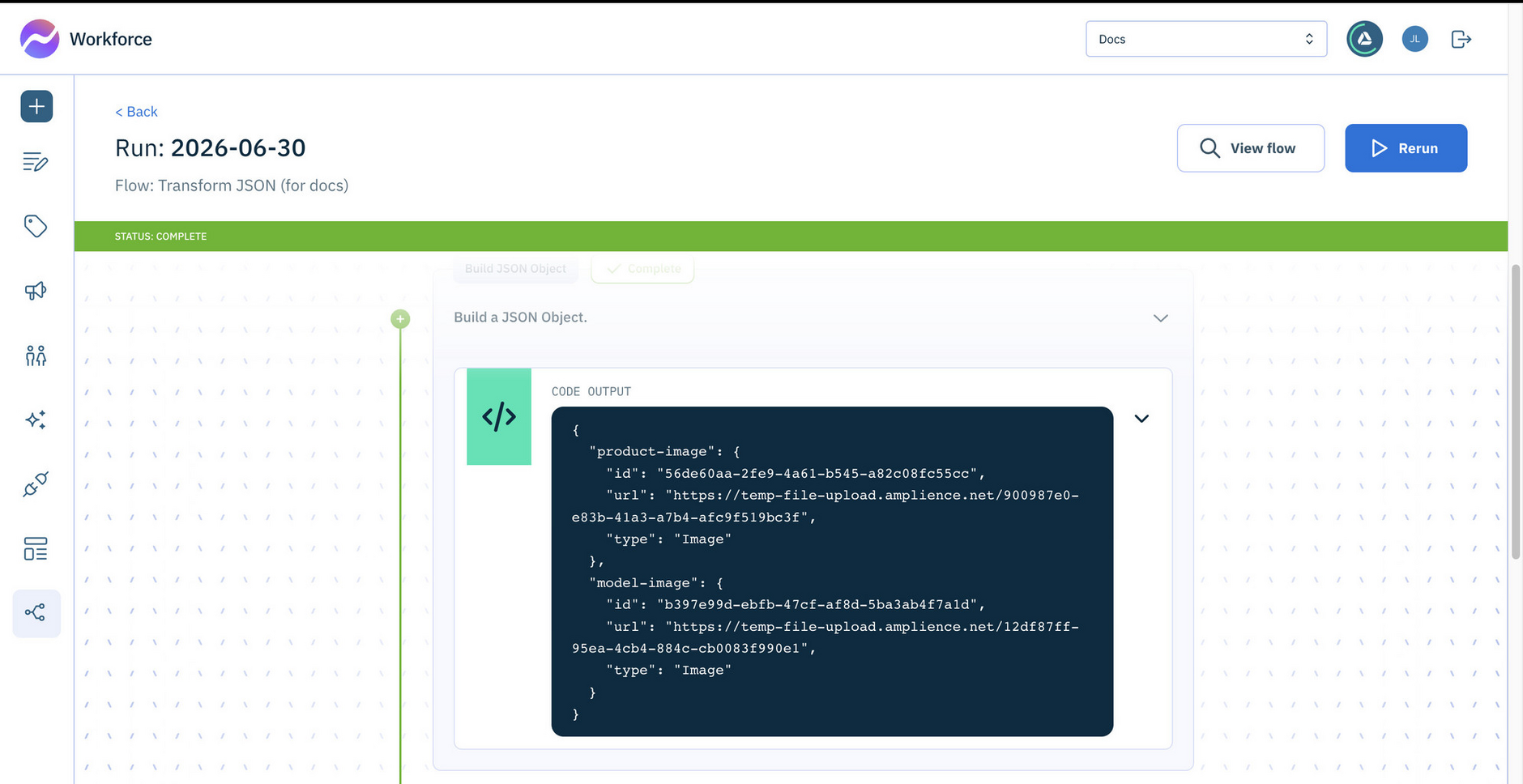
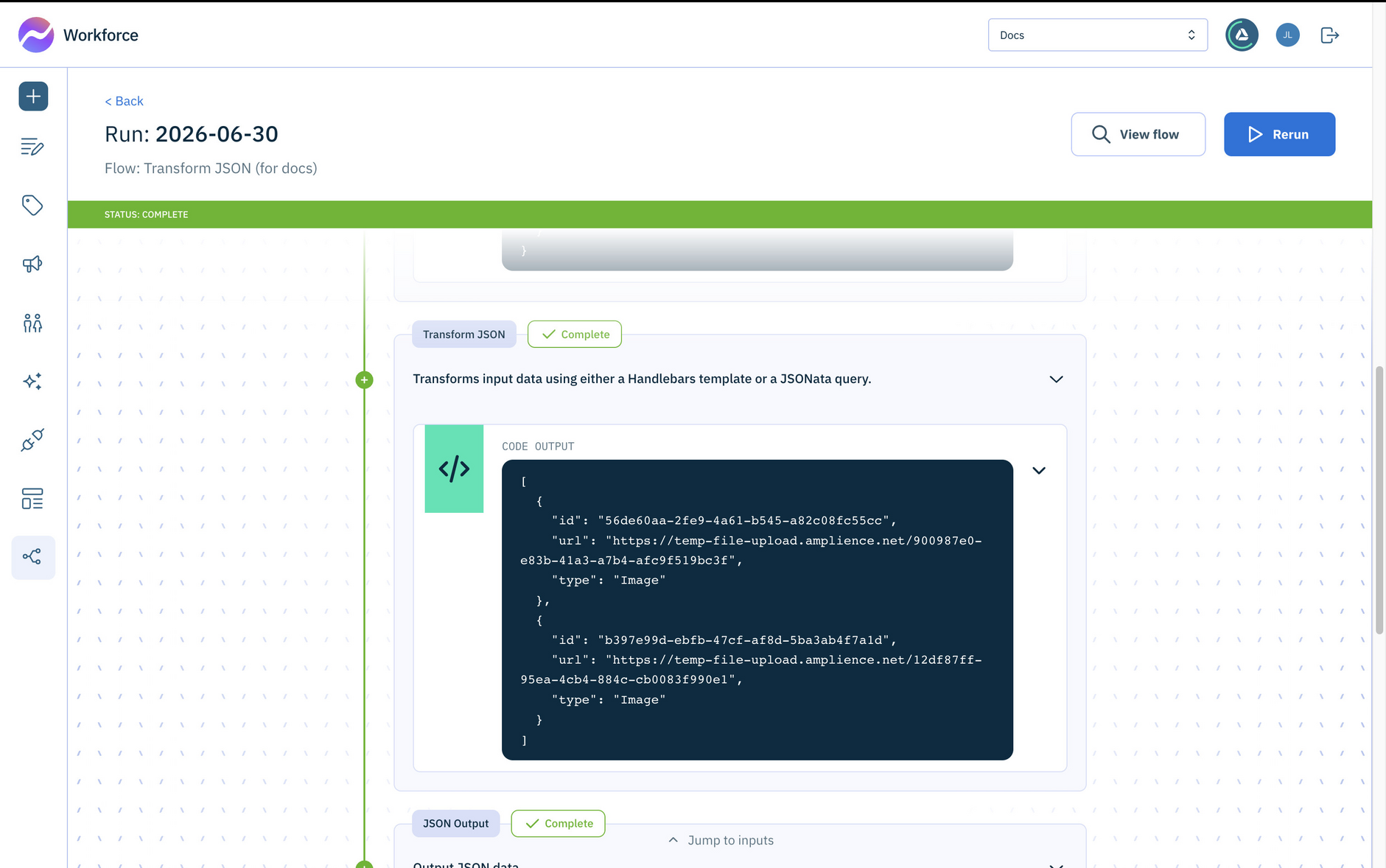
In the simplified example shown below, we're building a JSON object from user input, in this case two images, and then transforming it into an image format that can be passed to an action that accepts two images. To do this we're using a JSONata query to combine the two image objects onto a single array:
In the configuration section of the action, set the Transform language, in this case JSONata, but you can also use handlebars.
The input is the JSON to process, in this example the output of the Build JSON object action.
Here's an example of the flow running. The output of the Build JSON action is shown, containing the images chosen by the user. But we need this data as an array of images, so we need to transform it.
After running the Transform JSON action, the JSON is now has the correct structure to send as input to our action.
Encode URLLink copied!
Encodes a string into a URL-safe format.
Inputs
| Input | Type | Required | Description |
|---|---|---|---|
URL | string | Yes | The URL to encode |
Outputs
| Output | Type | Description |
|---|---|---|
Encoded URL | string | The result of encoding the URL |
Decode URLLink copied!
Decodes a URL-encoded string into plain text.
Inputs
| Input | Type | Required | Description |
|---|---|---|---|
URL | string | Yes | The URL-encoded string to decode |
Outputs
| Output | Type | Description |
|---|---|---|
Decoded URL | string | The result of decoding the URL |
Get Item from ListLink copied!
Identifies and extracts the value for the first, last, or nth item in a list.
Inputs
| Input | Type | Required | Description |
|---|---|---|---|
List | array | Yes | The list of items to choose from |
How to select the Item | string | Yes | Whether to return the first item, the last item, or an item at a specific position. Accepted values: first (default), last, index |
Position | number | No | The position of the item to extract, starting at 0. Only required when How to select the Item is set to index |
Outputs
| Output | Type | Description |
|---|---|---|
Item | any | The item found at the requested location |