SharePoint actions
The SharePoint extension provides actions for retrieving files and folders from SharePoint within Workforce Flows. Use these actions to access drive item metadata via SharePoint share links as part of your automated content processes.
You can install this action extension from the Workforce integration marketplace.
Tip
These action descriptions cover the most commonly used inputs and outputs. When designing flows, you may also notice additional input and output variables.
PrerequisitesLink copied!
The SharePoint extension uses Microsoft Graph authentication. Configure the following environment variables before using the action.
| Variable | Type | Required | Description |
|---|---|---|---|
MICROSOFT_GRAPH_TENANT_ID | string | Yes | The tenant ID for Microsoft Graph API authentication. |
MICROSOFT_GRAPH_CLIENT_ID | string | Yes | The client ID for Microsoft Graph API authentication. |
MICROSOFT_GRAPH_CLIENT_SECRET | string | Yes | The client secret for Microsoft Graph API authentication. This value is write-only. |
For details of how to obtain the credentials you need to configure the SharePoint action extension, see:
Get SharePoint information by linkLink copied!
Retrieves file or folder information from SharePoint using a share link.
Inputs
| Input | Type | Required | Description |
|---|---|---|---|
link | string | Yes | The share link to a SharePoint file or folder |
Outputs
| Output | Type | Description |
|---|---|---|
driveItems | array | A list of drive item objects. See Drive item object below |
Drive item object
Each entry in the driveItems array contains the following fields:
| Field | Type | Description |
|---|---|---|
id | string | Unique identifier of the drive item in Microsoft Graph |
name | string | Name of the drive item |
webUrl | string | URL to view the item in a web browser |
size | number | Size of the item in bytes |
createdDateTime | string | Date and time the item was created |
lastModifiedDateTime | string | Date and time the item was last modified |
eTag | string | ETag for the item, used for change detection |
cTag | string | Content tag for the item, used to detect content changes |
isAuthoritative | boolean | Whether this item is the authoritative version |
context | string | OData context URL for the response |
downloadUrl | string | URL to download the file directly |
createdBy.user.email | string | Email address of the user who created the item |
createdBy.user.displayName | string | Display name of the user who created the item |
lastModifiedBy.user.email | string | Email address of the user who last modified the item |
lastModifiedBy.user.displayName | string | Display name of the user who last modified the item |
parentReference.driveType | string | Type of drive containing the item (e.g. documentLibrary) |
parentReference.driveId | string | Unique identifier of the drive |
parentReference.id | string | Unique identifier of the parent folder |
parentReference.name | string | Name of the parent folder |
parentReference.path | string | Path to the parent folder within the drive |
parentReference.siteId | string | Unique identifier of the SharePoint site |
file.mimeType | string | MIME type of the file. Present only when the item is a file |
file.fileExtension | string | File extension. Present only when the item is a file |
file.hashes.quickXorHash | string | Quick XOR hash of the file for integrity verification. Present only when the item is a file |
fileSystemInfo.createdDateTime | string | Date and time the item was created on the file system |
fileSystemInfo.lastModifiedDateTime | string | Date and time the item was last modified on the file system |
image | object | Image metadata. Present only when the item is an image |
photo | object | Photo metadata. Present only when the item is a photo |
shared.scope | string | Scope of sharing (e.g. users, organization, anonymous) |
Example output
Example
Here's the Get SharePoint information by link action in use.
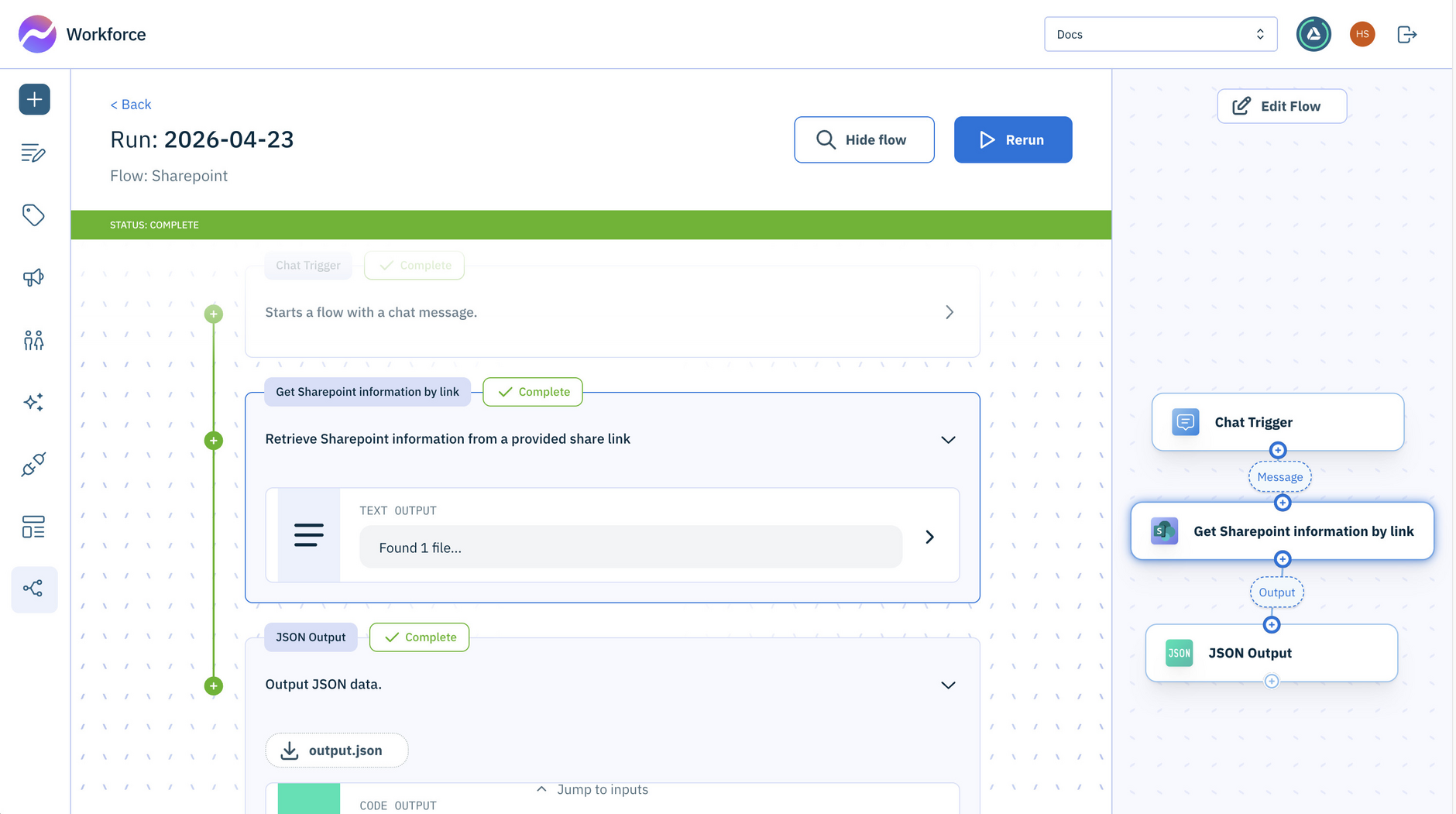
Passing a SharePoint link to this action
To dynamically pass a SharePoint link each time the flow runs, set the SharePoint Share Link field to an output variable from another action, such as a trigger. If you enter a link directly into the field, the flow will always use that specific file.
Add item to SharePoint listLink copied!
Creates a new list item in a SharePoint list when given a share link to the target list along with the field values for the new item.
Inputs
| Input | Type | Required | Description |
|---|---|---|---|
link | string | Yes | The share link to the SharePoint list (e.g. https://contoso.sharepoint.com/:l:/...) |
data | object | Yes | A JSON object containing the field names and values for the new list item |
Outputs
| Output | Type | Description |
|---|---|---|
item.id | string | The unique identifier of the created list item |
item.webUrl | string | The URL to view the item in a web browser |
item.fields | object | The field values of the created list item |
item.createdBy.user.email | string | The email address of the user who created the item |
item.createdBy.user.displayName | string | The display name of the user who created the item |
item.createdDateTime | string | The date and time the item was created |
item.lastModifiedBy.user.email | string | The email address of the user who last modified the item |
item.lastModifiedBy.user.displayName | string | The display name of the user who last modified the item |
item.lastModifiedDateTime | string | The date and time the item was last modified |
How it works