Workforce flows
Workforce flows help take the effort out of content production at scale, whether you’re working with text or media. They use the latest AI models while adhering to your brand guidelines, and let you include human review where you need it - keeping you in control of quality and creativity.
What is a Flow?Link copied!
A flow is a series of actions linked together to automate a process. Each action performs a specific task, such as content creation, approval or publishing, and together they create a repeatable, efficient workflow that reduces manual effort and ensures consistency.
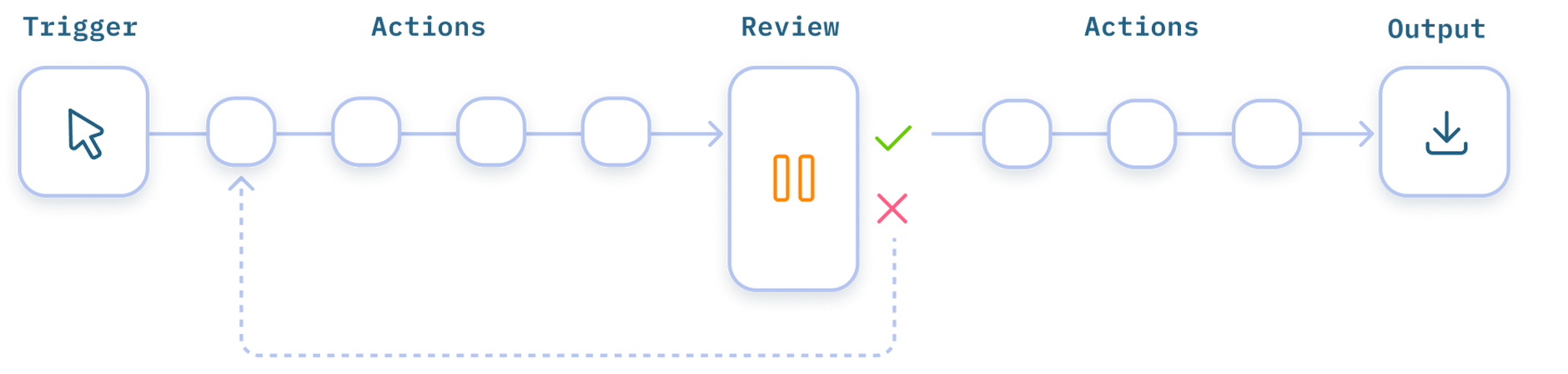
Workforce lets you design your own flows, with the flexibility to define the triggers, actions and review stages that fit with your processes. For example, instead of manually creating and translating alt text for images, use a flow to automate the process - automatically generating alt text when an image is uploaded, then translating it into multiple languages. See the Generate alt text example.
Special types of actions, called agents, make flow design even simpler by combining related steps or actions together. For example, the Brand rule agent simplifies the process of creating content that’s targeted for a brand.
Why use Workforce Flows?Link copied!
Flows go beyond basic automation - they use AI to transform the way you work. By automating repetitive tasks and connecting them into end-to-end processes, you can work more efficiently from start to finish.
Control when work startsLink copied!
Flows can start manually, such as when a user submits a form, or automatically. Both ways are controlled using triggers.
Automate processesLink copied!
Bring related tasks together into a single automated process, involving people only when their input is needed, without relying on emails, reminders, or manual coordination. Browse our example flows.
Track progress easilyLink copied!
Each time a flow runs, you can view a clear record of what happened. See when it was started, the actions performed, and the outputs produced. You can also check whether the results were reviewed, approved, or sent back for changes giving you full visibility of the status of every run. Learn more about flow runs.
Keep human review in the loopLink copied!
Build in human review where it matters most, so outputs can be checked, refined, and approved before moving forward. This helps to maintain quality and consistency, while still benefiting from automation. Find out about flow reviews.
Integrate your existing product dataLink copied!
Workforce Flows can integrate with your existing commerce and product data platforms, so your flows can use live product details like titles, descriptions, and attributes. This keeps everything consistent without the need for manual copy and paste between systems. Explore Integrations.
What you can do with FlowsLink copied!
Flows enable you to automate and control content and image workflows across your systems. You can trigger processes from events, generate and transform content, apply AI-powered enrichment, standardize and optimize assets, and update or export content to other platforms - all as part of a structured, repeatable workflow.
Here are a few examples:
- Generate alt text for uploaded images - Automatically generate and translate alt text, then apply to the image asset in Content Hub
- Generate localized product descriptions - Create product descriptions from product data, translate into multiple languages and export to a CSV file
- Standardize product images - Apply a series of automated image transformations to meet brand requirements, then send for human review
For more ideas and to see how flows work, see our example flows.
Get started with FlowsLink copied!
First, decide what you want to achieve:
-
Build flows – In Workforce, to automate and connect tasks you need to build a flow. You can get started quickly by jumping straight to Building your first flow.
-
Run or review flows – Once a flow has been created, you can run it to automate a process, track progress and review its outputs. See Running and reviewing flows.
If you're interested in using Workforce Flows, it's available as an additional feature. To have it enabled on your account, please contact your Account Manager.