Agents
A list of the built in agents, including their purpose, inputs and outputs.
Agents have access to a LLM with a system prompt, a goal and a defined list of 'tools'. The tools are actions that the LLM can choose to utilize.
These action descriptions cover the most commonly used inputs and outputs. When designing flows, you may also notice additional input and output variables.
Decision agentLink copied!
Uses AI to evaluate your input against the criteria you provide, then chooses the best pre-defined path.
Inputs
- Instructions, branches, input text, input images
Outputs
User defined branches.
How to use
Use the Decision Agent when you want to use AI to make a decision and split the path of the flow.
This example flow, intakes images, uses brand rules to generates long descriptions using a custom template, then uses the Decision Agent to assign those to a specific person for human review based on category.
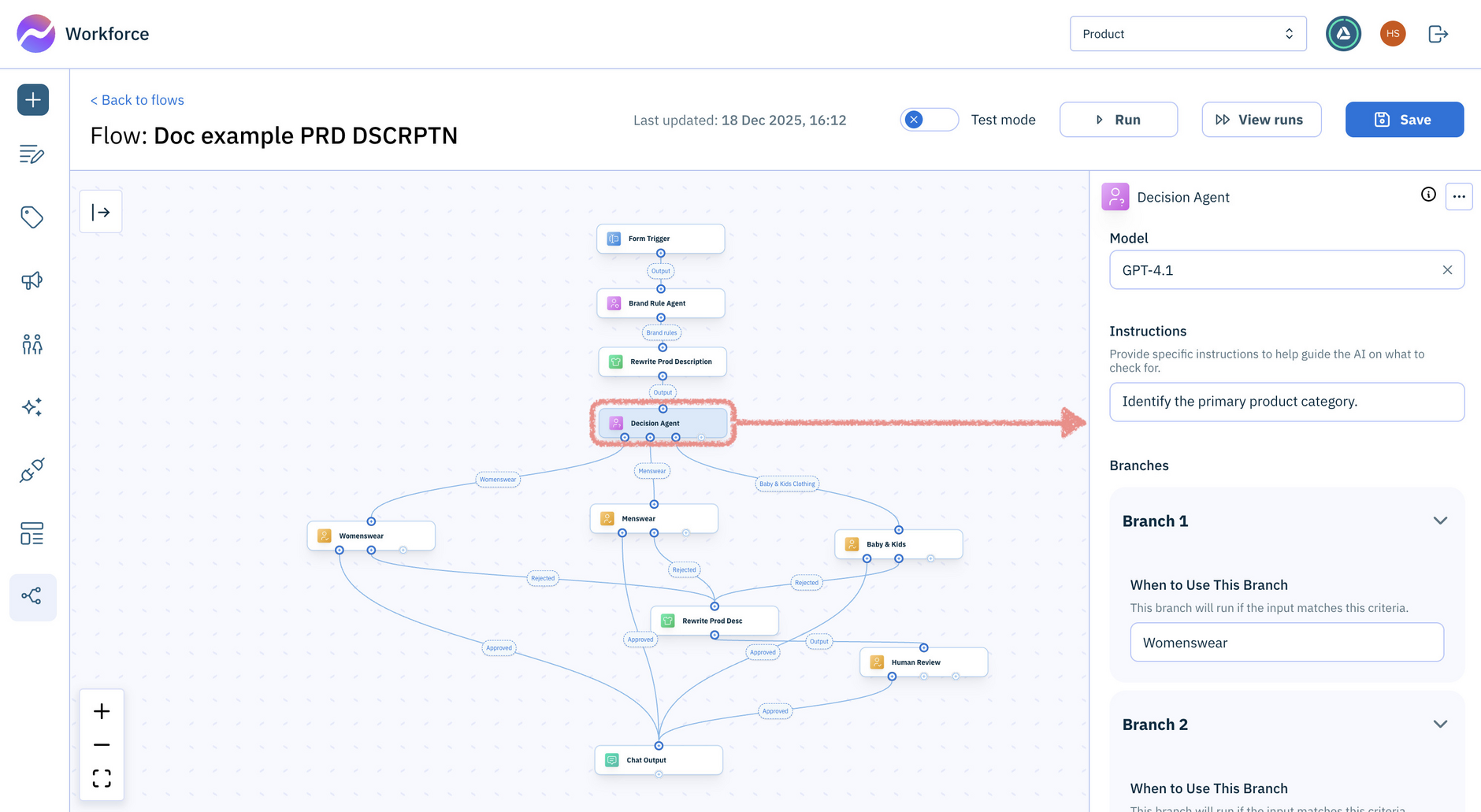
The Decision Agent properties (shown on the right) allow you to:
- Define custom instructions, such as “Identify the primary product category.”
- Specify the criteria for each decision branch in the When to use this branch field, for example “Womenswear Products.”
The agent will have an output port for each branch you create, so you can run the relevant actions for each branch. During a flow run, only one branch will match, so only one path will be taken.
Research agentLink copied!
Researches your input to gather information that supports your goal or question.
Inputs
- Goal, text to analyze, images to analyze
Outputs
An AI Summary dependent on your goal.
When to use
When you want additional info from the web.
Featured in these example flows
Brand rule agentLink copied!
This agent analyzes a brand guide and extracts only the rules relevant to a specific input scenario.
Inputs
- Brand guide, text to analyze, images to analyze
Outputs
Extracts brand rules that match the text.
When to use
When you want to filter your brand rules for a specific scenario.
Translation agentLink copied!
This agent translates text content for multiple locales.
Inputs
- Text (a string)
- A list of locales, comma separated, for example: fr-FR, de-DE
Outputs
An array of objects.
When to use
The original text is analyzed and the LLM decides what locale it is in. The original text is then returned along with its locale. Each of the translated outputs are also returned.
Featured in these example flows
Custom agentLink copied!
Uses AI to help you find answers, make decisions, or gather key information based on your question or goal.
Inputs
- Prompt, tools, text to analyze, images to analyze
Outputs
Outputs dependent on prompt.
When to use
A flexible agent that you can customize to meet your needs.